
Quick answer: The questions that separate a platform from a collection of tools sharing a login screen are not about features. They are about whether the system shares a data model, whether AI inherits your permissions, whether the frontline can reach the process without a corporate email, whether a hiring decision leaves a defensible record, whether onboarding starts automatically at signature, and whether the vendor will put terms behind its adoption claim. Ask all eight below in every demo, including ours.

Why demos do not answer the real question
Every recruiting platform demos well. That is what demos are for.
The problem is that the difference between a unified platform and a well-integrated set of tools is invisible in a demo, because a demo shows each step working. What it does not show is what happens between steps: whether the data moved on its own or whether someone moved it, and whether the reporting can span the funnel afterward.
So the evaluation has to be conducted in questions rather than screens. Bring these to any vendor conversation, including ours.
Question 1. Does the system share a data model, or just a login?
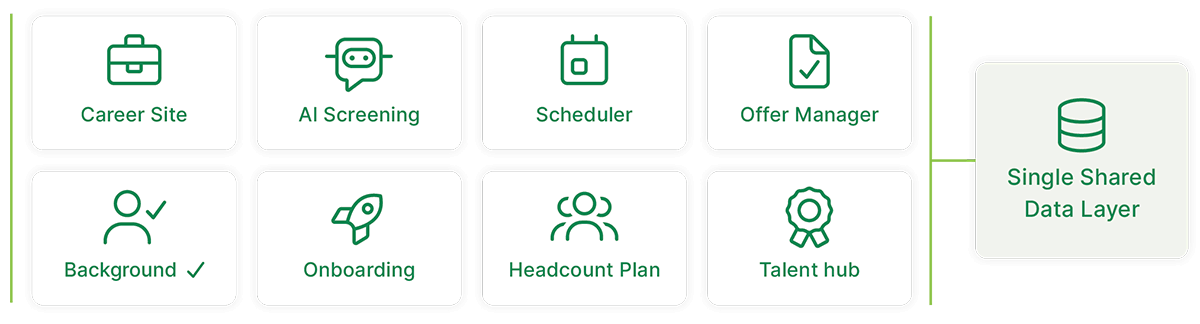
This is the question the other seven depend on.
A shared data model means a signed offer starts onboarding with no re-entry, a candidate's source is attributed automatically, and a 90-day retention rate appears next to the channel that produced the hire. A shared login means each product is reached from one nav bar and the data still moves by sync, export, or hand.
Single login is a convenience. Shared data is a different product.
What a good answer sounds like: the vendor walks one candidate record through three stages without switching products and without anyone typing the candidate's information twice. What a weak answer sounds like: the word "integrated," followed by a description of a nightly sync.
Question 2. How does AI access candidate data, and where are the permission boundaries?
Any AI in a hiring workflow is handling resumes, compensation, interviewer assessments, background-check results, and diversity data. The governance question is not optional.
Ask whether the AI inherits role-based permissions or maintains its own, whether a user can surface results through AI that cross their access boundaries, whether candidate or employee data is ever used to train public models, and whether AI actions are logged in the same audit trail as human ones.
What a good answer sounds like: AI inherits permissions rather than overriding them, scope follows the calling user, data stays inside your boundaries, model choice is a configuration setting, and every action is logged. What a weak answer sounds like: a security page and an assurance that the model is enterprise-grade.
Question 3. Can the frontline reach the process without a corporate email or a company device?
Most hiring is frontline hiring. The store associate, the charge nurse, the field technician, and the warehouse crew have a phone, often a personal one, and nothing else.
If a candidate or new hire needs a second app, a kiosk workaround, or a company device to apply, schedule, or onboard, the platform does not actually reach your workforce.
What a good answer sounds like: a live walkthrough on a phone, plus a specific mechanism for reaching a new hire who has no company account yet, such as an SMS invite or a QR code at the location. What a weak answer sounds like: "it is fully responsive."
Question 4. Does a hiring decision leave a defensible record?

In regulated industries, the public sector, and any union environment, every decision has to be explainable, and explainable means consistent across candidates.
Ask whether scorecards, approvals, communications, and screening results live on one record or across five systems that do not agree. Ask what the retention and deletion policy looks like when a search closes, and whether it is configurable to your legal team's requirements.
What a good answer sounds like: one record containing the criteria, the questions asked, the scorecards, the approval chain with names and timestamps, and the screening sequence, including the adverse action steps in order. What a weak answer sounds like: a reporting module.
Question 5. Does onboarding start automatically at signature, or is it a second project?
This is the transition where the most value is won or lost, and it is the one most vendors treat as somebody else's scope.
A platform connects the offer to provisioning, document collection, training assignment, and the directory the moment a candidate signs. A collection of tools hands the new hire to a separate team and a separate system and calls that the end of recruiting.
What a good answer sounds like: a signature triggering a role-based workflow with no manual handoff, demonstrated rather than described. What a weak answer sounds like: an onboarding module that a person launches after the offer is marked accepted.
Question 6. What happens when we add the next workflow?

Most organizations buy recruiting first and then need scheduling, learning, or communications within two years. The cost of that second decision is set by the first one.
Ask whether adding a capability is a configuration or an implementation, whether identity, permissions, and integrations carry forward, and whether historical data comes with it.
What a good answer sounds like: the next business area inherits the identity model, the permission structure, and the employee record already in place, so the integration tax goes down rather than up with each addition. What a weak answer sounds like: a roadmap and a new statement of work.
Question 7. What breaks while we switch, and how long until we are live?
Two questions come up in every evaluation before a contract is signed: how long until this is live, and what breaks while we change over. Make the vendor answer both with dates and dependencies.
Ask for the standard timeline rather than the best case, who is assigned to you by name/job title, whether training happens during the build or at the end, and what runs alongside your existing systems during the transition.
What a good answer sounds like: a phased timeline with named roles, work in your current systems continuing throughout, and a launch-readiness review before anything goes live. What a weak answer sounds like: "most customers are live in a few weeks," with no phases named.
Question 8. What does adoption look like at 90 days, and does the vendor back it with anything?

Every claim above depends on people using the system. A defensible record requires that hiring managers actually score in the platform. A source-to-retention report requires that onboarding data lands there.
Ask for adoption evidence at comparable organizations, in your industry and with your workforce mix. Then ask whether the vendor puts terms behind the number.
What a good answer sounds like: a documented adoption rate at organizations like yours, plus a contractual commitment. What a weak answer sounds like: a case study about a company that looks nothing like yours.
Get the complete playbook: End-to-End Talent Acquisition: The Modern Recruiting Playbook includes the full evaluation chapter, the vendor scorecard, and the five demonstrations to insist on in every demo.
Five things to ask to see, not to hear about
Questions get answered. Demonstrations get remembered. Insist on these five in every demo:
- "Show me a signed offer that starts onboarding, provisioning, and training without anyone re-entering the candidate."
- "Show me what a frontline candidate sees on their phone, and how they apply without a corporate email."
- "What triggers a stalled-application alert, and who sees it?"
- "What is your adoption rate at 90 days, and do you back it with anything?"
- "Walk me through what happens when we add scheduling after we have deployed recruiting."
Number five is the one that most reliably separates a platform from a portfolio, because it is a question about the second purchase rather than the first.
How to score what you hear
Keep it simple enough that three people on the committee score it the same way. Eight criteria, five points each, forty points total. This is deliberately unweighted, so every criterion carries equal value and the conversation stays about evidence rather than about which criteria matter most.
Score each criterion 5 if it is fully addressed with evidence you saw, 3 if it is partially addressed, and 1 if it is unaddressed or unclear:
- Shared data model, not just a shared login
- AI governed by user permissions, with data that never trains public models
- Reaches the frontline without a corporate email or company device
- Start with one capability and expand without re-implementing
- Offer, background check, and onboarding on one record
- A signed offer that triggers onboarding, provisioning, and training automatically
- HITRUST plus SOC 2 Type II plus ISO 27001 on one unified system
- A documented adoption rate, backed by a guarantee
Two scoring disciplines matter more than the arithmetic. Score what you were shown, not what you were told. And have each stakeholder score independently before comparing, because the security stakeholder and the recruiting stakeholder tend to hear entirely different demos.
Where MangoApps fits

MangoApps built the Talent Acquisition Suite on a single data layer rather than assembling it, which is why the answers above can be demonstrated rather than described. Eight capabilities, from career site and screening through scheduling, offers, background checks, and onboarding, write to one candidate record, and that record continues into HR operations, learning, and scheduling as the same employee.
On question six specifically: expansion is a business area turned on, not a new implementation, because identity, permissions, and integrations across Workday, SAP SuccessFactors, UKG, ADP, BambooHR, and 200+ other systems are already in place. On question seven: implementations typically run 8 to 12 weeks with a named Customer Success Manager, a Technical Account Manager, an Implementation Specialist, and a Design Team, with support that continues through every renewal. On question eight: 90%+ adoption within 90 days of launch, backed by the Adoption Guarantee, which means that if employees do not adopt after launch, you do not pay.
15+ years building for the frontline, 2M+ users, 98% customer retention, NPS 78, a 99.9% uptime SLA, and certifications covering HITRUST CSF, SOC 2 Type II, ISO 27001, FedRAMP ATO, HIPAA, and GDPR.
Frequently asked questions
What is the difference between an ATS and a talent acquisition platform?
An applicant tracking system tracks candidates through stages. A talent acquisition platform runs the whole path, requisition through onboarding, on one record, which is what makes a signed offer able to start work in another part of the business. The practical test is not the label. It is whether anything has to be re-entered between stages.
Who should be on a talent acquisition evaluation committee?
Recruiting leadership, at least one hiring manager who will live in the tool, IT for identity and integrations, security or compliance for candidate data, and HR operations for the onboarding handoff. In regulated, public-sector, or union environments, add legal or labor relations early rather than at contract stage.
How long should a talent acquisition platform evaluation take?
Long enough to see the same candidate record demonstrated across three stages and to get written answers on permissions, retention, and expansion. In practice that is a handful of weeks, not months. Evaluations stall when the committee compares feature lists instead of scoring what was demonstrated.
Should we score vendors with weighted criteria?
You can, but be careful with the arithmetic. A weight column that is labeled and never applied to the total is worse than no weighting at all, because it looks rigorous and is not. The eight-criteria, five-points-each version above is unweighted on purpose. If your organization genuinely values some criteria more, apply real multipliers and show them in the total.
Start with the playbook. End-to-End Talent Acquisition: The Modern Recruiting Playbook carries the evaluation framework and the scorecard to run your shortlist through. When the committee is ready to score us, schedule a call and we will take the five demonstrations in order.
Keep reading
The MangoApps Team
We're the product, research, and strategy team behind MangoApps — the unified frontline workforce management platform and employee communication and engagement suite trusted by organizations in healthcare, manufacturing, retail, hospitality, and the public sector to connect every employee — deskless or desk-based — to the people, tools, and information they need.
We write about enterprise AI for the workplace, internal communications, AI-powered intranets, workforce management, and the operating patterns behind highly engaged frontline teams. Our perspective is grounded in a decade of building for frontline-heavy industries and shipping AI agents, employee apps, and integrated HR workflows that real employees actually use.
For short-form takes, product news, and field notes from customer rollouts, follow Frontline Wire — our ongoing stream on AI, frontline work, and the modern digital workplace — or learn more about MangoApps.


