
Shift Feedback
Collect and manage feedback from employees about their shift experiences.
MangoApps
Meet the agent
This app ships with a production AI agent — permission-aware, tenant-scoped, audit-logged, and governed by the Agent Development Lifecycle.
Shift Feedback AI
Pulse rating, tag frequency, manager-side insight.
Overview
Shift Feedback asks employees for a quick rating right after they check out, tied to that shift and attendance record — 1–5 stars, an optional tag like 'understaffed' or 'good team', and a comment, not a generic survey dropped into their inbox. Anonymous submissions are supported and stay anonymous everywhere they're viewed, including by admins and by Ask AI.
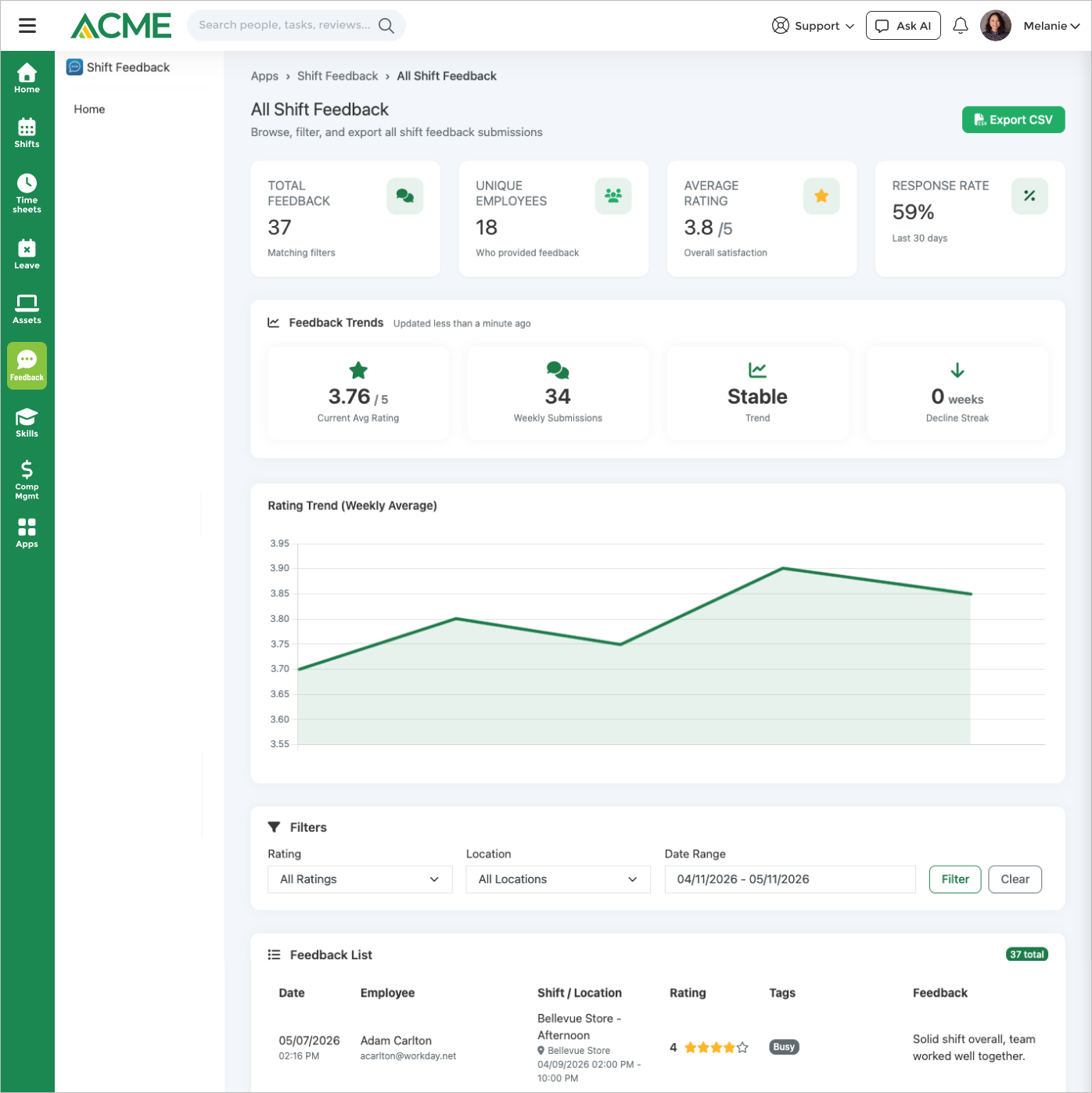
Every submission notifies managers right away, with a separate alert when the rating is low, so a bad shift doesn't sit unnoticed. On the dashboard, eight weeks of ratings are tracked for declining trends and rising negative tags, surfaced the moment a manager checks in instead of waiting on a manual report.
Ask AI can pull a period's feedback figures, open one submission, list an employee's own history, or submit their feedback for a shift they just worked — with a confirmation step before anything is recorded. Every rating feeds Mango Signal, MangoApps' cross-app workforce sentiment layer.
See how Shift Feedback collects a quick post-shift rating tied to the actual shift and attendance record, alerts managers when a rating is low, and tracks eight weeks of sentiment trends and rising negative tags on the dashboard.
Highlights
Capabilities
Feedback Collection
-
Post-shift rating on a 1–5 star scale
-
Optional written comment with each submission
-
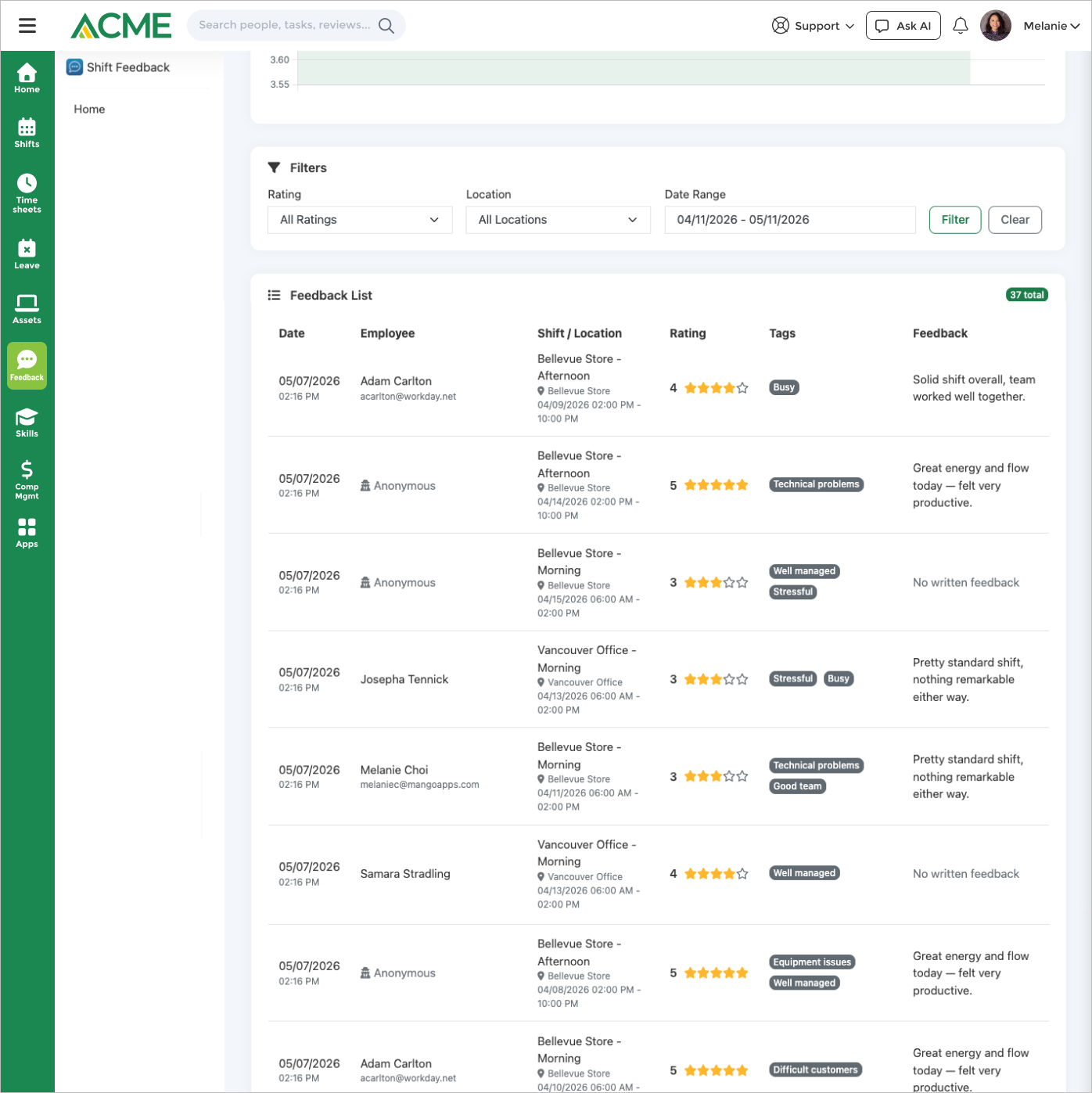
Predefined and employee-added tags on each submission
-
Anonymous submission option (admin-controlled)
-
Feedback window opens automatically after checkout
-
Ad-hoc / unscheduled shift feedback (off by default)
-
Early-checkout feedback (off by default)
-
Automatic reminders to employees with unrated shifts
-
Edit a submission within 24 hours
-
One submission per shift (duplicate guard)
AI Insights & Trends
-
Ask AI agent: feedback trends & statistics in chat
-
Agent filters by period, rating range, and tag
-
Personal feedback-history query via Ask AI
-
8-week rating-trend analysis with decline detection
-
Rating-decline and low-rating trend alerts on the dashboard
-
Rising negative-tag detection with recommendations
-
Admin toggle to disable the AI agent per business
Manager Review & Alerts
-
All-feedback dashboard with rating / location / date filters
-
Drill into an individual feedback detail view
-
Related feedback from the same shift shown alongside
-
Real-time low-rating alerts to managers
-
New-feedback notifications to managers
-
Location- and reporting-chain-scoped visibility
Tags & Configuration
-
9 built-in shift-experience tags
-
Enable / disable the tag feature per business
-
Employee-added custom tags (admin-enabled, max 50 chars)
-
Require-rating toggle for submissions
-
Configurable low-rating alert threshold
Reporting, Export & Access
-
Summary stats: total, average rating, high/low counts
-
30-day response rate against completed shifts
-
Unique employee contributor count
-
CSV export (admin-gated)
-
Web and mobile-web submission
-
REST API: submit, list, update, and list eligible shifts
Limits & Specs
-
Rating scale: 1–5 stars
-
Eligible shifts per employee: 3 by default (admin-selectable: 1, 2, 3, 5, or 10)
-
Feedback window: 1 week default (admin-selectable: 24 hours – 2 weeks)
-
Built-in feedback tags: 9 (busy, calm, stressful, understaffed, well_managed, equipment_issues, technical_problems, good_team, difficult_customers)
-
Low-rating alert threshold: 2 stars by default (admin-selectable: 1–3)
-
Reminder frequency: Every 24, 48, or 72 hours
-
Submission edit window: 24 hours after submitting (API)
-
Pricing: License required (per-tenant opt-in)
Screenshots

Use cases
Resources
FAQ
Employees submit a quick rating, tag, and optional comment right after checking out from a completed shift. Each submission is tied to the shift's attendance record. Admins configure the eligibility window and reminders in Settings.
Employees can submit anonymously when an admin has enabled the option (on by default). Anonymous submissions are never attributed anywhere — not on the dashboard, the detail view, or in Ask AI.
There's no reply thread. Managers act on feedback through real-time low-rating alerts, a filterable dashboard, and trend analysis that flags rating declines and rising negative tags.
Shift Feedback requires a license and is opt-in per tenant — an administrator enables it from the Apps Marketplace, and it's disabled by default until then.
Surveys is for periodic engagement surveys you design and distribute broadly. Shift Feedback is a fixed, quick check-in tied to a specific completed shift and prompted right after checkout — continuous measurement rather than a campaign. Both feed into Mango Signal.