Tasks
Task management for incident follow-ups and project work.
MangoApps
Meet the agent
This app ships with a production AI agent — permission-aware, tenant-scoped, audit-logged, and governed by the Agent Development Lifecycle.
Tasks AI
Full task lifecycle in chat with confirmation on every write.
Overview
Not every task starts with someone typing it in. A Forms submission can trigger one automatically through conditional task rules, and AI Notepad turns a meeting's action items into assigned tasks, syncing completion back to the meeting when they're closed. A task can also link directly to an OKR Hub goal or key result, or to a Service Desk ticket.
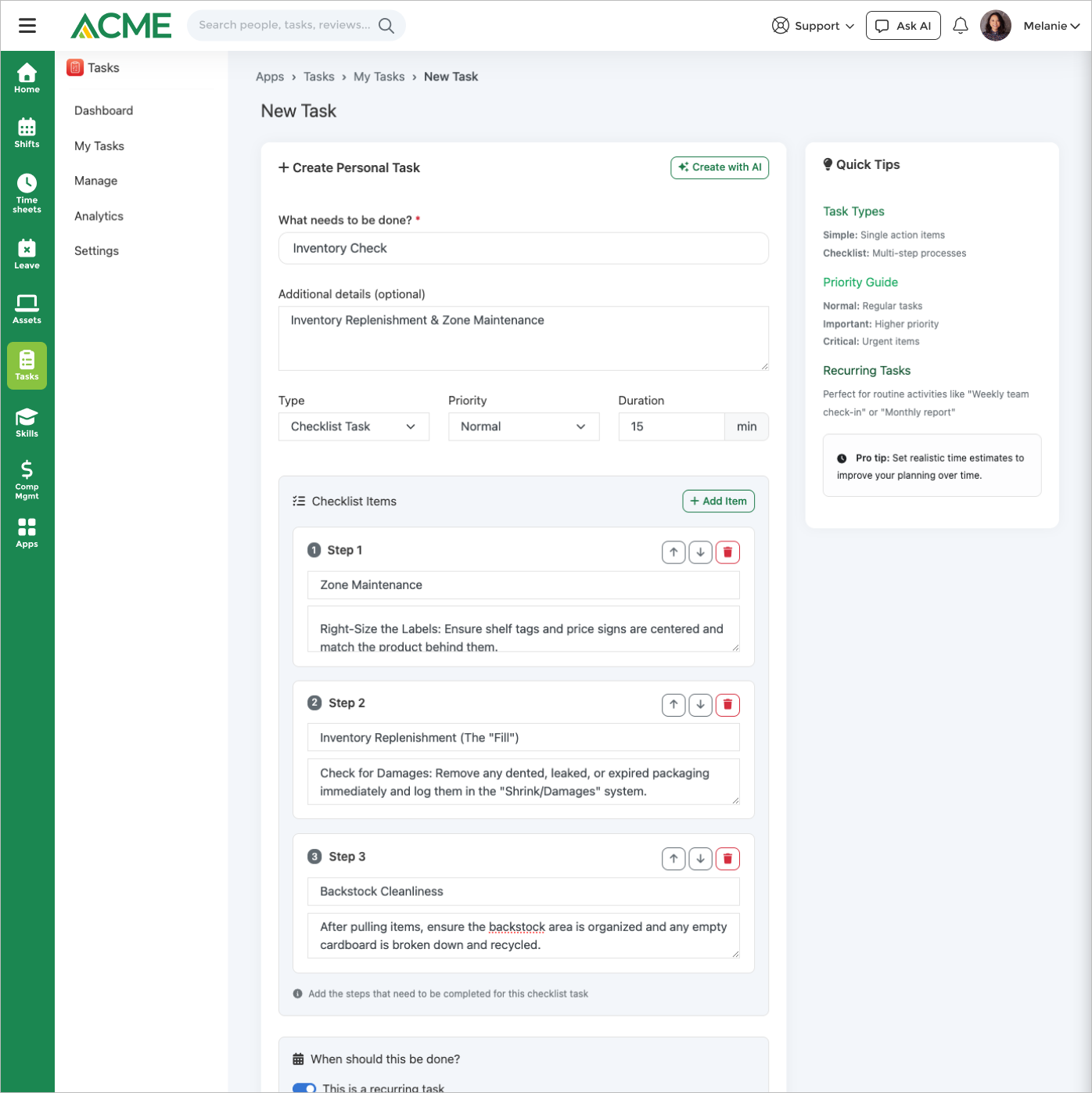
Checklist tasks can require a photo, a note, or a signature before they can be marked done, and smart assignment routes new, unassigned work to the least-loaded eligible person under a per-user concurrent-task cap. The same task records also power Workspaces project to-dos, so project-level and organization-wide work run on one system instead of two. An AI agent can create, assign, complete, and escalate tasks from chat, showing a diff you confirm before anything saves.
Plan work on a kanban board, calendar, or sortable table, require a photo, note, or signature before a checklist task can be marked done, and run tasks by chat with an AI agent that previews every write.
Highlights
Capabilities
Task Board & Views
-
Kanban board grouped by status (default view)
-
Calendar view of start and due dates
-
Sortable, searchable table view
-
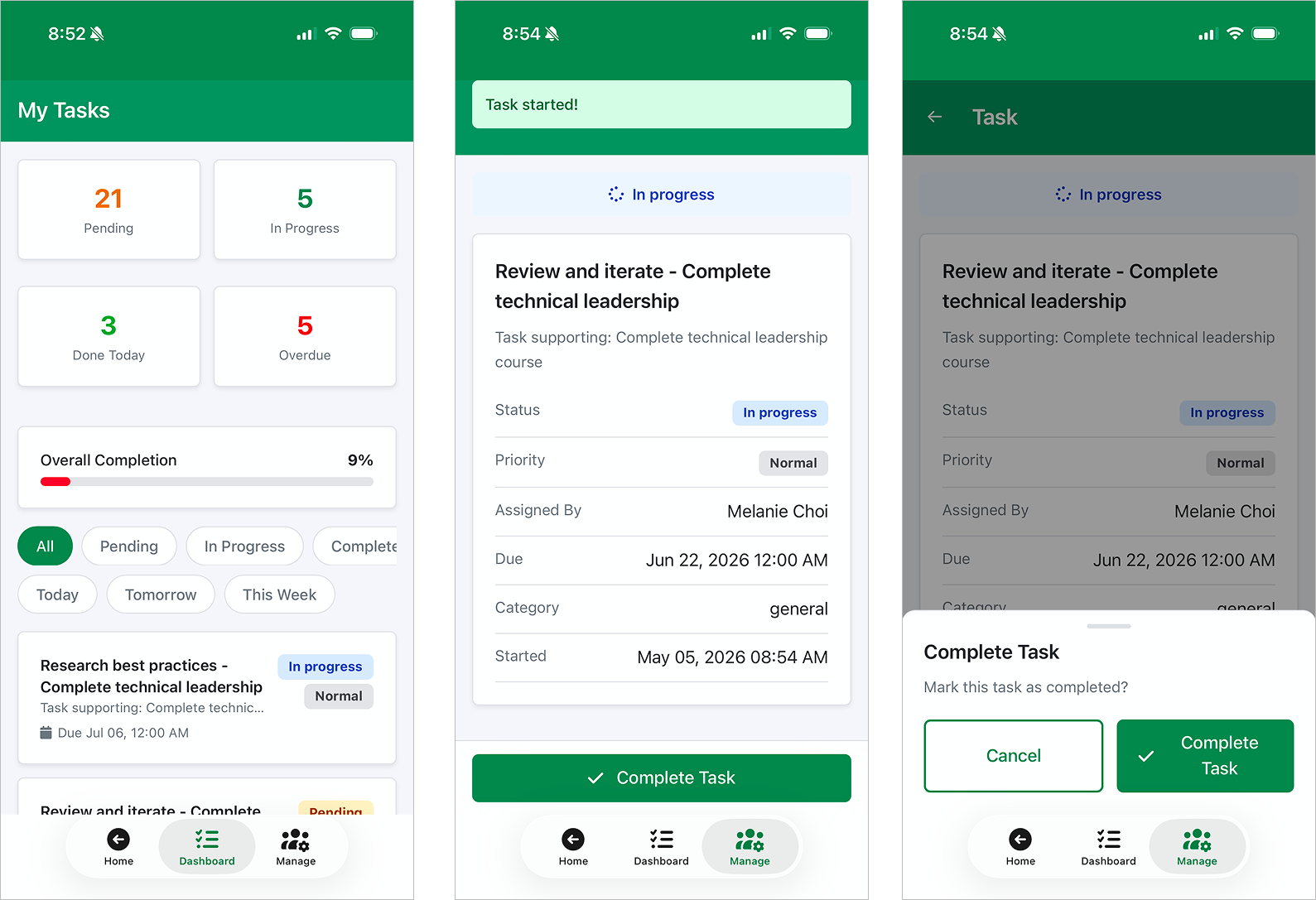
Quick filters: status, priority, type, assignee, location, due window
-
Keyword, semantic, and hybrid search across tasks and templates
-
Live completion-rate and workload dashboard with CSV export
Create, Track & Complete
-
Create tasks with title, description, and category
-
Simple and checklist task types
-
Priority levels: normal, important, critical
-
Start-date + due-date planning window with a per-task reminder
-
Clone an existing task
-
Escalate, verify, and reopen tasks across their lifecycle
Checklists & Field Proof
-
Ordered checklist items with per-item photo and notes requirements
-
Photo upload and signature capture on completion
-
Auto-complete the task when every checklist item is checked
-
File and document attachments (PDF, Office, images)
-
Sub-tasks (parent/child hierarchy)
Templates & Recurring Work
-
Save any task as a reusable template
-
Template library: create, edit, duplicate, activate/deactivate, bulk actions
-
Industry starter-template packs (one-click load)
-
AI-drafted task templates from a plain-language description
-
Recurring schedules: daily, weekly, monthly, every shift
-
Role-, location-, and department-based auto-assignment
-
Estimated duration per template
Assignment & Delegation
-
Assign tasks to any business user
-
Reassign or delegate a task to another team member
-
Smart auto-assignment to the least-loaded eligible user
-
Bulk assign, complete, cancel, reopen, or delete tasks
-
Generate tasks from one template for many users at once
-
Per-user concurrent-task cap (admin-configurable)
AI Assistant & Notifications
-
AI Tasks agent: create, assign, complete, cancel, reopen, and escalate by chat, with a diff preview before each write
-
Admin toggle to enable or disable the AI agent per business
-
In-app, email, and due-soon reminders on assignment, completion, and overdue
-
SMS alerts for critical-priority tasks
-
Daily task digest for managers
App Integrations
-
Forms — auto-create tasks on submission via task rules
-
AI Notepad — turn meeting action items into tasks
-
OKR Hub — link tasks to Goals, Key Results, and Objectives
-
Service Desk — link tasks to support tickets
Limits & Specs
-
Task title max length: 255 characters
-
Board / table load caps: 500 tasks (board) · 1,000 tasks (table)
-
Max document size: 10 MB per file
-
Supported attachment formats: PDF, DOC/DOCX, XLS/XLSX, PPT/PPTX, TXT, CSV, and images
-
Recurrence options: Daily, Weekly, Monthly, Every Shift
-
Pricing: License required (per-tenant opt-in)
Screenshots


Use cases
FAQ
Set a task or template to repeat daily, weekly, monthly, or every shift. New task instances are generated automatically on the schedule, and templates can auto-assign each occurrence by role, location, or department.
Yes. Forms can create tasks on submission via task rules, and AI Notepad turns meeting action items into tasks. Tasks can also be linked to OKR Hub Goals/Key Results/Objectives and to Service Desk tickets.
Yes. Checklist items can each require a photo or a note, and a task can require a completion photo and a captured signature before it is marked done. Tasks also accept file and document attachments (PDF, Office formats, and images) up to 10 MB each.
From the Ask AI sidebar, the Tasks agent can list, create, assign, complete, cancel, reopen, and escalate tasks in plain language. Write actions show a diff preview and ask you to confirm before anything is saved, and an admin can turn the agent on or off per business.
Admins and per-app Tasks administrators can always assign; whether plain managers can assign is an admin setting. When smart assignment is enabled, a new task with no assignee is routed automatically to the least-loaded eligible user, and you can cap the number of concurrent active tasks per person.
They share the same underlying record, but Workspaces to-dos live inside a specific project workspace and appear on that project's canvas with workspace-branded notifications. The standalone Tasks app manages organization-wide tasks with reusable templates, recurrence, a kanban/calendar/table board, manager analytics, and cross-app integrations.
Tasks requires a license and is opt-in per tenant — an administrator enables it for your business from the Apps Marketplace, and it is disabled by default until then. Contact your MangoApps administrator about enabling it for your organization.