Task Management That Works How Teams Do
Every employee sees what's on their plate; every manager sees progress in real time. Checklists with photo evidence and sign-off when the work has to be proven, not just marked done.




What Tasks Helps You Do
Six everyday actions, all in one app.
Create Tasks
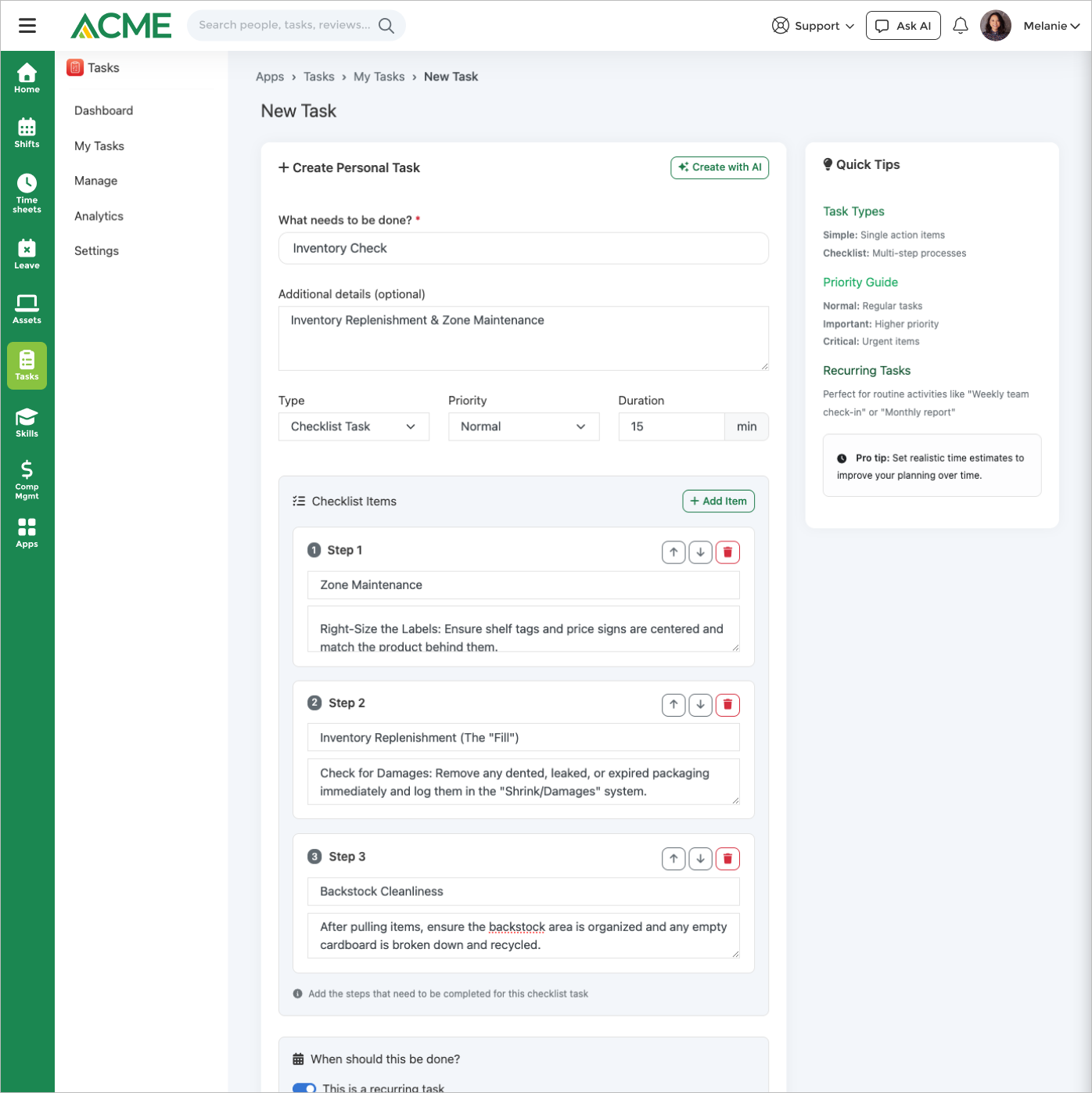
Simple to-dos or multi-step checklist tasks with photo evidence, completion notes, and digital signatures required at the item level when needed.
Assign & Prioritize
Assign to individuals, roles, or departments. Three priority levels (normal, important, critical) and five statuses (pending, in progress, completed, overdue, cancelled).
Switch Views
Card, table, kanban, and calendar — one-click switching. Filter by status, priority, assignee, location, category, or due date.
Run Templates
Reusable task templates with checklists, priorities, evidence requirements, and assignment rules. Recur daily, weekly, monthly, or by shift.
Verify Completion
Optional manager verification adds an approval layer for safety-critical or compliance-sensitive work. Auto-escalation for critical overdue tasks.
Track Analytics
Completion rates, overdue trends, top performers, average completion times, and task-type performance. CSV exports for reporting.
One App, Three Audiences

For Employees
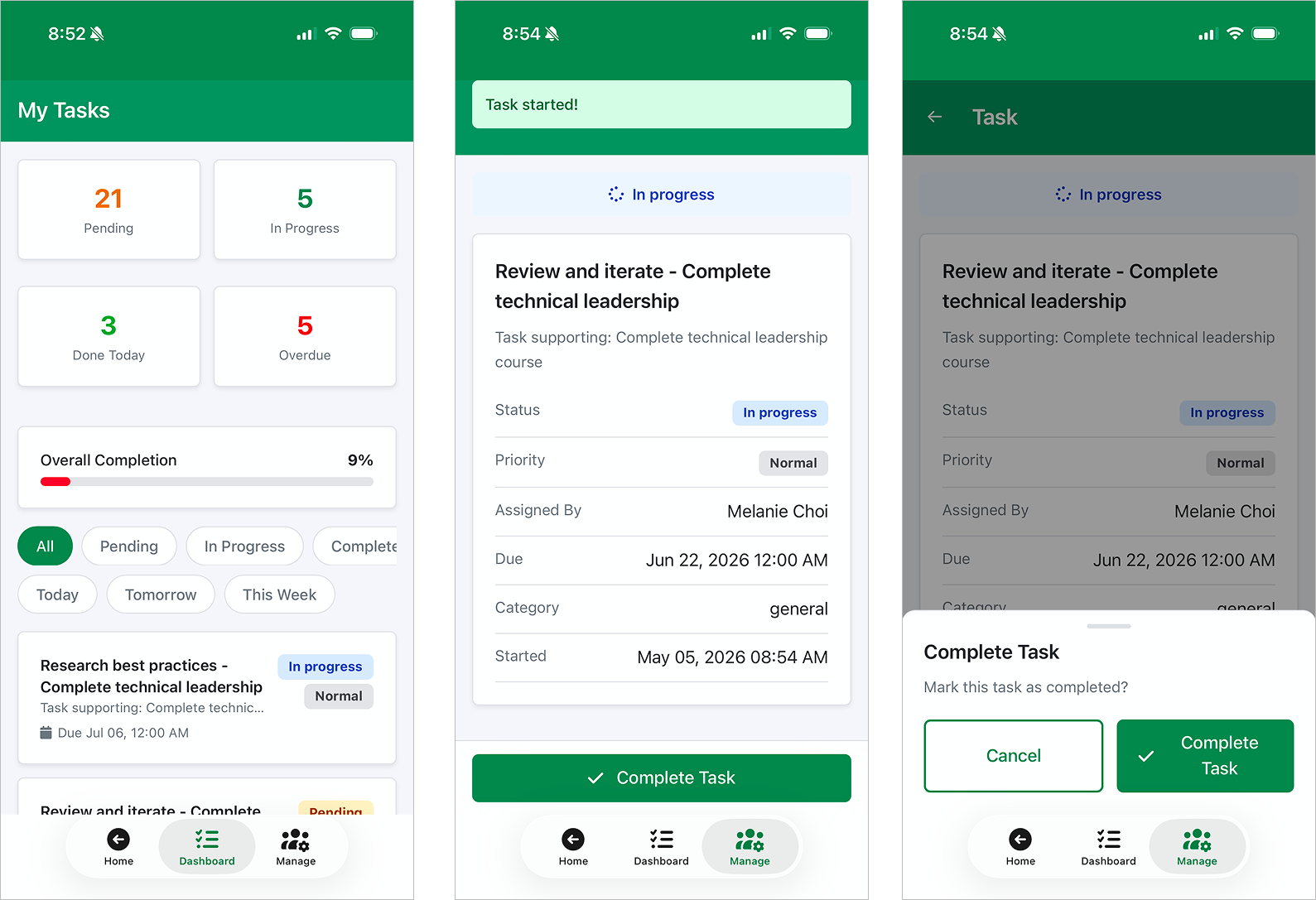
A personal task dashboard with today's workload, overdue items, and four ways to view the work.
- Personal dashboard — pending, in-progress, completed, with today's load and overdue at a glance.
- Four views — card for a quick scan, table for sortable detail, kanban for status flow, calendar for deadlines.
- Built for the frontline — view, start, complete, capture photo evidence, add notes — all from a phone.
- AI-powered semantic search — find tasks by meaning, not just keywords.

For Managers
Assignment, visibility, and verification across an entire team — without micromanaging.
- Checklist tasks — multi-step work with per-item photo, notes, and signature requirements.
- Bulk actions — complete, cancel, reassign, or delete multiple tasks at once.
- Escalation — auto-escalate critical overdue tasks to the assignee's manager.
- Verification — review and approve completed work before it's marked final.
- Daily digest — manager summary delivered by email or in-app with overdue and at-risk.

For Admins & Ops
Templates, recurring schedules, analytics, and the integrations that connect Tasks to the rest of the platform.
- Reusable templates — checklists, priorities, evidence requirements, assignment rules baked in.
- Assignment rules — by role, location, or department, with per-user capacity limits.
- Recurring schedules — daily, weekly (specific days), monthly, or by shift.
- Intelligence scoring — ranks templates by usage and completion rate so the right templates rise.
- Analytics & exports — completion rates, overdue trends, top performers, task-type performance, CSV export.
Why Task Management Stalls Most Teams
Disconnected tools, missed deadlines, and invisible workloads cost teams time and morale every day.
Scattered Priorities
Action items live in emails, chat messages, sticky notes, and spreadsheets. No single source of truth for what needs to get done.
No Team Visibility
Managers can't see what their team is working on, making it impossible to remove blockers or redistribute workload proactively.
No Proof Of Completion
Safety checks and inspections get marked done with no photo evidence, notes, or verification — compliance suffers and work doesn't get audited.
Repetitive Setup
The same tasks get created from scratch every shift, every week, every location. Without templates and recurring schedules, managers waste hours on setup instead of execution.
Overdue Items Slip Quietly
Without auto-escalation and daily digests, critical overdue tasks sit untouched for days. Managers only learn about the miss when something breaks downstream.
Frontline Workers Can't Update From The Field
Desk-first task tools force deskless workers to wait until end-of-shift to log completions, capture photos, or flag exceptions — by then the context is gone.
One Platform For Every Task And Shift
MangoApps brings personal to-dos, team task management, and operational checklists into a single platform. Reusable templates and recurring schedules eliminate repetitive setup; four built-in views let everyone work the way they prefer.

Tasks In Practice
A practical scope check: what the app covers, which controls matter, and the workflows teams usually run first.
Core workflow
Create, assign, and track tasks with priorities, due dates, and status workflows.
Controls that matter
Notifications includes In-app notification on task assignment and In-app notification on task completion.
Scope and specs
Useful specs: Task title max length: 255 characters; Category max length: 100 characters; Max photo upload size per task: 10 MB per photo.
Incident follow-up actions
After a safety incident, corrective action tasks are created automatically with assignees and deadlines for resolution tracking.
Project task management
Team leads break down projects into tasks, assign to team members, and monitor progress through status updates.
Recurring compliance tasks
Schedule monthly fire extinguisher checks, quarterly safety drills, or annual certification renewals as recurring tasks.
Connected To The Rest Of MangoApps
→ Workspaces
Task lists inside a Workspace flow into the personal Tasks app. One unified task list spanning every Workspace you're on.
→ Goals & OKRs
Link tasks to company goals, objectives, and key results. Task completion updates goal progress automatically — strategy stays connected to daily work.
→ Shifts & Scheduling
Shift-specific tasks appear when relevant. Link tasks to employee schedules so frontline workers know exactly what's expected each shift.
→ Forms
Automatically create tasks from form submissions with conditional rules. Route assignments by form fields, roles, or departments — with dynamic due dates.
→ Inspections
Trigger corrective-action tasks from inspections and audits. Require photo evidence and manager verification before they close.
→ Mobile
Purpose-built for frontline workers in the field. Complete tasks, capture photos, update checklists, and receive push notifications from any device.
REPLACES POINT TOOLS
One task system instead of separate desk-worker and frontline tools
Most companies pay for a desk-worker project tool that ignores the frontline — then bolt on a separate shift-task app for store and plant work. Tasks runs personal to-dos, project work, and operational checklists on one platform.
Asana
Mid-market project and task tool
- One per-employee suite license — no separate tier for the roughly 70–80% of staff on the frontline
- Operational checklists (shift, inspection, safety) live next to project tasks
- Identity, audit, and retention unified with the rest of the employee platform
Trello
Kanban-board task tool, popular for small teams
- Scales beyond a kanban board — list, calendar, Gantt, and operational views in one
- Tasks tie to the work record (shift, work order, recognition) — not just to a card
- Reaches frontline staff in the app they use for shifts and pay
Monday.com
Heavyweight work-management platform
- Bundled per-employee — no separate workOS contract on top of seat fees
- Frontline checklists, personal to-dos, and project boards on one tool
- Workflow triggers reuse the same automation engine as every other app
Microsoft Planner / To Do
M365's task tools for desk workers
- Works for the roughly 70–80% of frontline staff without a Microsoft 365 license
- One task system instead of Planner + To Do + Lists + Loop
- Cross-app context (chat, file, shift, recognition) without a Power Automate flow
Todoist Business
Personal task manager extended to teams
- Built for the team and the org, not the individual extended to a small team
- Audience and assignment reuse the live HRIS — no parallel user list
- Same audit, retention, and identity perimeter as the rest of the platform
PLATFORM ADVANTAGE
Tasks inherits everything else MangoApps already does
A standalone task tool has to build, buy, or integrate each of these. Tasks gets them for free because the platform already runs them.
HRIS-synced assignment
Assign by role, location, or shift from the live HRIS — no parallel project-tool roster to scrub every quarter.
Identity & SSO
Inherits SAML/OIDC SSO, MFA, and SCIM. New hires can be assigned tasks on day one and lose access instantly on termination.
Cross-app context
A task ties to a shift, work order, recognition, or chat — one tap to the linked record, no second tool to switch to.
Mobile app & push
Frontline staff complete shift tasks, snap photos, and update checklists in the same app they use for their schedule.
Audit log & retention
Every task add, edit, complete, and reopen lands in the same audit log Legal and Ops already use across every other module.
Workflow & automation
A task can trigger a form, a notification, a recognition, or a follow-up task — using the same automation engine as every other app.
INDUSTRY FIT
Built for orgs whose work isn't only at a desk
Tasks fits operators whose checklists, inspections, and project work happen across desk, field, and shop floor.
Retail
Shift-opening, merchandising, and pre-close checklists for store associates in the same app that runs their schedule.
Healthcare
Shift handoff, clinical checklist, and accreditation prep tasks with audit trail and unit-level assignment.
Manufacturing
Plant-floor inspections, line-changeover, and safety tasks with photo capture in the worker's preferred language.
Field Service
Work-order tasks, customer-site checklists, and parts pickups in the same app the technician dispatches and logs work from.
Hospitality
Room-readiness, event-setup, and brand-standards checklists for housekeeping, F&B, and front desk teams.
WHY MANGOAPPS WINS
One platform beats a stack of point solutions on every axis
The case Ops, IT, Finance, and Project Management all share — and the one a desk-worker task tool structurally cannot answer.
Cheaper than the stack
One per-employee suite license replaces Asana, Monday.com, the separate frontline-tasks app, and the Microsoft Planner add-on.
More secure
One identity perimeter, one audit log, one retention policy across every task. Nothing extra for security to certify.
Easier to deploy
Already deployed if you have MangoApps. Assign from existing HR audiences, create the first task today.
Easier to use
Tasks live in the same app employees opened for shifts and pay — one login, one notification stream, one inbox.
Easier to manage
Assignment reuses the live HRIS hierarchy — no parallel project-tool roster to keep in sync with HR.
Easier to extend
A task can trigger a form, an inspection, a recognition, or a follow-up task — same automation as every other app.
AI is actually better
Tasks AI triages, suggests assignment, and chases follow-up using cross-app signals (shift, project, recognition, past completion rate) — under the same permission model as every other agent.
Tasks Screenshots
Real product screens from Tasks workflows, pulled from the app screenshot gallery.


Controls That Keep It Manageable
Notification Channels
Email, SMS, and in-app alerts. Configure due-date reminders, overdue escalation, quiet hours, and daily manager digests.
Quiet Hours & Frequency
Org-wide quiet hours suppress notifications during off-hours. Per-user frequency controls let employees tune their channels.
Photo Evidence
Per-task and per-checklist-item evidence requirements. Photos, digital signatures, and completion notes captured and stored with the task.
Verification Workflow
Optional manager approval before tasks are marked final. Critical-task verification keeps compliance audits clean.
Capacity Limits
Configure per-user capacity caps on template assignments so individual employees don't get overloaded.
Audit Trail
Every assignment, status change, evidence capture, and verification logged with operator and timestamp.
Pair Tasks With AI
Tasks AI handles triage, assignment, and follow-up in chat — and PersonalAgent surfaces your tasks across the whole platform.
Tasks AI
Task triage, assignment, follow-up, and natural-language task creation.
Customer Success
How Organizations Drive Efficiency
 Customer Case Studies
 Customer Case Studies
 Customer Case Studies
 Video Case Studies
 Video Case Studies
 Video Case Studies
Our department saves a significant amount of time using Workflow Apps. Before, we probably had 18 to 25 individual Excel spreadsheets out there that we had to manually put together and update, which was extremely time-consuming and inconvenient.

Mark Jones
Director of Litigation and Special Investigations Unit
Shelter Insurance


4 Keys To Project Collaboration & Execution
Download our whitepaper to see how high-performing teams align tasks, deadlines, and accountability — and what separates them from teams that fall behind.

Frequently Asked Questions
Two types. Simple tasks are single-item assignments with a title, description, priority, and due date. Checklist tasks contain multiple steps where each item can require its own photo evidence, completion notes, or verification before the task closes. Both types support file attachments, document uploads, and completion notes.
Templates define reusable task configurations — checklists, priorities, evidence requirements, and assignment rules. You assign templates by role, location, or department with configurable capacity limits per user. Recurring tasks repeat daily, weekly (on specific days), monthly, or by shift. Each recurrence automatically creates a new task instance.
Four. Card view shows tasks as visual cards in a grid. Table view is a sortable, searchable data table. Kanban view displays tasks in drag-and-drop status columns. Calendar view plots tasks by due date. All views support filtering by status, priority, assignee, location, and category.
Yes. Tasks and individual checklist items can require photo uploads, digital signatures, or completion notes before they can be marked complete. Especially useful for safety inspections, equipment checks, and compliance-sensitive work. Managers can also enable optional verification to review and approve completed tasks.
MangoApps delivers task notifications via email, SMS, and in-app. Configure due-date reminders (hours before deadline), automatic overdue escalation to managers, daily digest summaries, and quiet hours to suppress off-hours notifications. Critical overdue tasks can auto-escalate to the assignee's manager after a configurable threshold.
Yes. The MangoApps mobile app provides a dedicated task experience where frontline workers can view assignments, start and complete tasks, capture photo evidence, update checklist items, and add completion notes — all from their phone or tablet. Push notifications deliver new assignments and deadline reminders in real time.
Yes. Forms integration defines conditional rules that automatically create tasks when a form is submitted. Conditions are based on form field values, routing to the submitter, their manager, or specific roles and departments, with dynamically calculated due dates.
Let's Talk
Every team. Every employee. Every workflow. One AI platform — built for the frontline. Since 2008, trusted by 2 million+ users with an NPS of 78.
Why Choose Us?
- Frontline AI: Governed AI for every employee and workflow.
- Top Security: HITRUST, ISO & SOC 2 certified.
- Exceptional UX: Delightful on mobile and desktop.
- Proven Results: 98% customer retention rate.
Rolled out to every employee at AutoZone (125,000), PetSmart (50,000+), A.S. Watson and Raley's (20,000) — and at larger retailers we are not permitted to name.

Prefer to explore first? Ask AI about Task Management Software & Team Checklists →