Offboarding
Structured employee exit process with automated tasks.
MangoApps
Overview
MangoApps Offboarding doesn't work off a static employee list that other systems have to poll or import — it runs on the same employee record as the rest of the platform. Completing a plan reaches directly into sibling apps: Benefits Management ends enrollments, voids future payroll deductions, and opens a COBRA eligibility record for the admin to review, while HR Files archives the employee's non-compliance documents. Where they're enabled, Password Manager reassigns the leaver's vault credentials and Contracts hands their contracts and obligations to their manager.
Resignations route through configurable notice-period and approval policies. Access revocation runs against a same-day SOX/SOC SLA with tiered escalation, and a guided wizard drafts separation agreements with ADEA/OWBPA and state-specific clauses. Group layoffs add WARN notices and 60-day compliance tracking.
Each plan is a working checklist: tasks and documents drawn from reusable templates, each with an owner, a due date and automatic reminders. Exit interviews run from your own question templates and roll up into exit-reason trends and NPS reporting. Knowledge transfer captures the leaver’s systems, contacts and in-flight work section by section and hands it to a named successor before the last day. After it, the Former Employee Portal gives ex-employees a token-authenticated place to retrieve their pay stubs, tax forms, HR documents and experience letters for a window you control.
Run every departure end-to-end — self-service resignations with policy-based approvals, auto-built department task plans, scheduled account deprovisioning, exit interviews, and compliance documents.
Highlights
Capabilities
Resignation Workflow
-
Employee self-service resignation submission
-
Configurable 1–3 approval levels (manager → dept head → HR)
-
Cascade approval — one authorized approver clears every level they can
-
Notice-period calculation from country / region / employee-type policies
-
Resignation withdrawal with reason, plus custom types and reasons per business
-
Email and in-app notifications at every approval stage
Offboarding Plans & Tasks
-
Auto-create a plan the moment a resignation is approved
-
Plan types: voluntary, involuntary, retirement, end-of-contract, layoff
-
Department-grouped task checklists (IT, HR, Facilities, Payroll, Legal, Finance)
-
Completion-percentage dashboard with needs-attention alerts
-
Employee self-service transition portal (tasks + documents)
-
Bulk CSV plan import with row-level preview
Task & Document Templates
-
System and custom offboarding templates
-
Template types: voluntary, involuntary, retirement, layoff, end-of-contract, custom
-
Role-level variants: entry, mid, senior, executive
-
Department-specific task and document templates
-
Attach a Forms app form to any task
Access Revocation & Automated Deprovisioning
-
One-click MangoApps account deactivation
-
Daily automated deprovisioning driven by the termination SLA
-
Live IdP deprovisioning connectors — Okta, Azure AD, Google Workspace Real API calls per provider; dry-run mode available via connection config
-
Departing employee's file ownership transferred to the manager, mailbox out-of-office and forwarding set (Drive / OneDrive)
-
SaaS seat reclamation (Slack) with recovered-cost logging
-
Reassign the leaver's password-vault credentials and contract portfolio to a surviving owner
Exit Interviews & Knowledge Transfer
-
Default 12-question exit interview (select, textarea, 1–5 rating, 1–10 NPS)
-
Custom exit-interview templates per business
-
Per-plan NPS score and interview summary, saved on the plan record
-
Section-based knowledge transfer (8 default sections)
-
Successor assignment, notified automatically when knowledge transfer is submitted
Compliance, Separation & Final Pay
-
Guided separation-agreement wizard (6 sections) with e-signature
-
ADEA / OWBPA clauses for employees 40+ and group layoffs; state-specific content (e.g., California non-compete prohibition)
-
Severance calculator — gross pay, federal / state / FICA withholding, and net
-
COBRA federal election notice with DOL deadline tracking
-
Final leave-balance settlement payout via Leave Management
HRIS, SLA, Group Terminations & Reporting
-
Inbound Merge.dev HRIS webhook (EMPLOYEE.terminated → auto-plan) with HMAC verification
-
SOX/SOC termination SLA (same-day primary, 1-business-day secondary) with append-only audit log
-
Tiered escalation: manager 24h → HR 48h → exec 72h
-
Group terminations with WARN notices (employee, union, state agency)
-
WARN 60-day compliance tracking and an OWBPA age-demographics report
-
Plan export as branded PDF and CSV
Limits & Specs
-
Approval levels: 1–3 (manager, dept head, HR)
-
Termination SLA: Primary same-day · Secondary 1 business day
-
COBRA notice deadline: 10 business days (federal)
-
Exit-interview default questions: 12
-
Bulk plan import: 5 MB CSV (~35,000 rows)
-
Pricing: License required; opt-in per tenant
Screenshots
Use cases
Resources
FAQ
Employees submit a resignation through self-service. It flows through 1–3 configurable approval levels — manager, then optionally department head and HR — and the system calculates the minimum notice period from your country/region/employee-type policies. An authorized approver (for example an admin) can cascade through multiple levels in one action, and email and in-app notifications fire at each stage. Employees can withdraw a pending resignation with a reason.
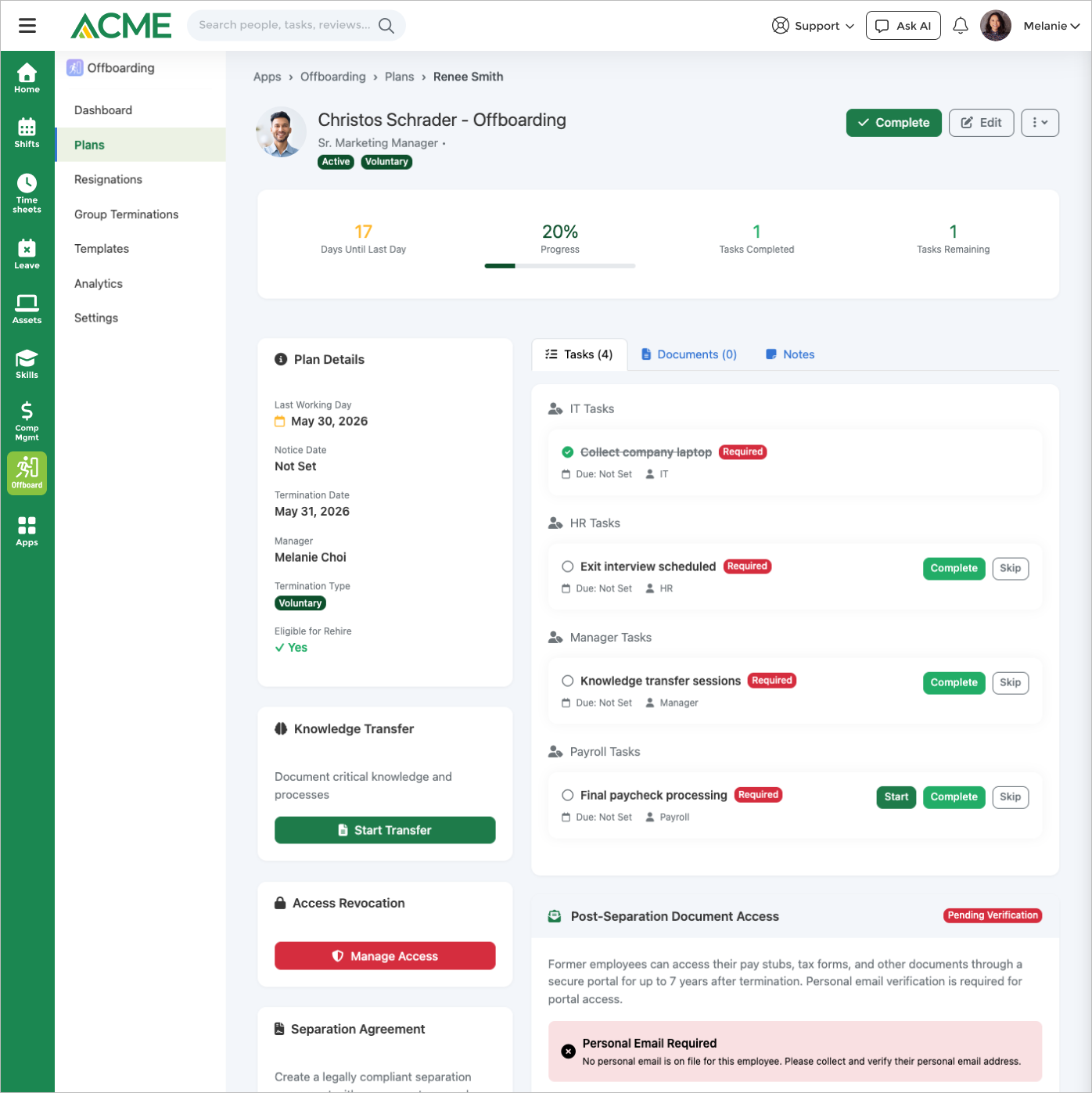
Each plan carries a task checklist grouped by department (IT, HR, Facilities, Payroll, Legal, Finance) with priorities and due dates auto-set from the termination date, a completion-percentage dashboard with needs-attention alerts, document collection, exit interview and knowledge transfer, and compliance paperwork. Tasks and documents come from reusable templates that support role-level and department-specific variants, and any task can have a Forms app form attached.
A daily job driven by the termination SLA deactivates the employee's MangoApps account. When you connect an identity provider, it also disables the account in Okta, Azure AD, or Google Workspace, transfers the departing employee's files to their manager, sets mailbox out-of-office and forwarding, reclaims paid SaaS seats (Slack) with recovered-cost logging, and reassigns their password-vault credentials and contract portfolio to a surviving owner. A dry-run mode is available while you validate a connection.
The access-revocation checklist tracks systems, physical items (badges, keys), and equipment, recording a condition, received-by, and return-date against each item before the checklist can be marked complete. When Asset Pro is enabled, that equipment list is pulled from the employee's actual assigned assets instead of a generic checklist, so asset tracking stays in Asset Pro while the offboarding plan confirms the return.
Exit interviews use a default 12-question template (select, free-text, 1–5 rating, and 1–10 NPS question types) or your own per-business template; each submission auto-calculates an NPS score and a summary stored on that plan. Knowledge transfer is captured across eight default sections — key responsibilities, critical processes, systems and tools, key contacts, ongoing projects, tribal knowledge, documentation and files, and recommendations — with an optional successor who is notified by email and in-app alert once the transfer is submitted. Both can be required gates before a plan is marked complete.
Yes. Group terminations let HR plan a layoff event, generate employee, union, and state-agency WARN notices, and track 60-day WARN compliance with an OWBPA age-demographics report. A severance calculator produces a gross-to-net breakdown (federal, state, and FICA withholding), and the separation-agreement wizard adds ADEA/OWBPA and state-specific clauses with e-signature.
Yes. An inbound Merge.dev HRIS webhook creates an offboarding plan when an employee is terminated in the connected HR system, with HMAC signature verification on every request. Plan creation is idempotent, so a replayed event won't produce duplicate plans.
Every departure is held to a same-day primary access-revocation target and a one-business-day secondary target for all required tasks, using holiday-aware business-day math. Progress and breaches are written to an append-only audit log per plan, and a tiered escalation chain notifies the manager at 24 hours, HR at 48 hours, and executives at 72 hours.
Onboarding Hub manages the start of the employee lifecycle — welcoming, provisioning, and ramping new hires — while Offboarding manages the exit: resignations, deprovisioning, exit interviews, separation agreements, and compliance. They are separate apps; each requires a license and is opt-in per tenant, disabled by default until an administrator enables it from the Apps Marketplace.