
A workforce platform only works if it works where employees actually are, with the tools they already use. Spring '26 extends the operational layer of the platform in four areas: real-time calendar integrations with Google and Outlook, Google Workspace file creation inside MangoApps, a substantially upgraded Messenger experience, and a mobile release that brings near-full parity with web across a wide range of workflows.
Real-Time Calendar Integrations: Google Calendar and Microsoft Outlook
Scheduling gaps between platforms create friction that compounds quickly. An event created in MangoApps doesn't show up in an employee's Google Calendar. A meeting added in Outlook isn't visible to teammates coordinating in MangoApps. Spring '26 closes that gap with real-time calendar integrations for both Google and Microsoft.
Google Calendar supports bidirectional, real-time sync. Changes made in either platform push to the other as soon as they happen. Admins can configure sync direction independently: bidirectional (recommended), MangoApps to Google only, or Google to MangoApps only. They can also select which event types sync, covering meetings, appointments, team events, company events, resource reservations, and custom event types. Multiple Google accounts are supported, each with independent sync settings and email domain scoping.
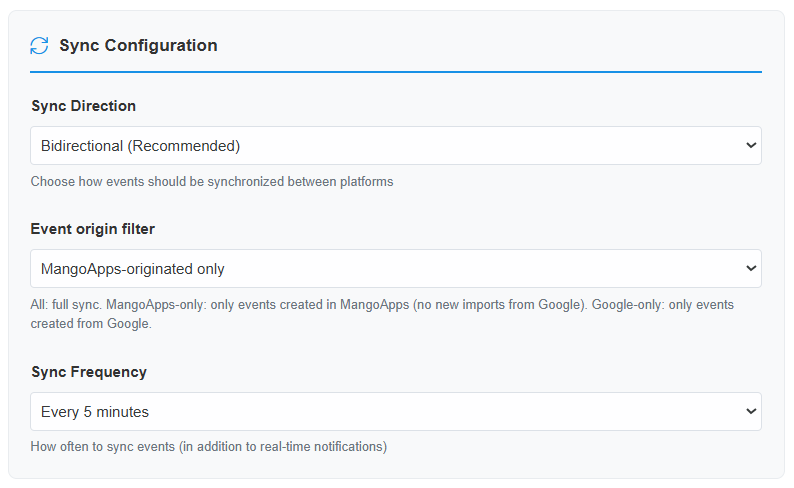
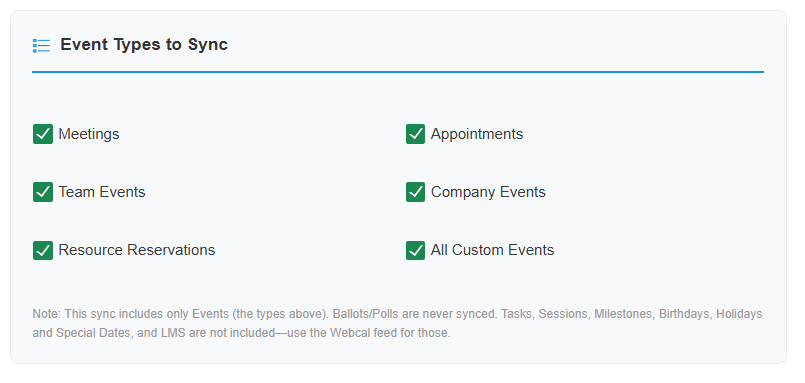
Microsoft Outlook sync runs one way, from MangoApps to Outlook. Events created or updated in MangoApps are pushed to users' Outlook calendars and arrive as standard meeting invites, including attendees. The same event type selection and sync frequency options apply. Multiple accounts are supported and can be enabled or disabled independently.
Both integrations sync event titles, descriptions, physical locations, meeting links from Zoom, Google Meet, and Teams, recurrence rules, and reminder timing. A background sync runs in addition to real-time pushes, with frequency configurable from every 5 minutes to every 4 hours, providing a safety net if any real-time updates are missed.
Google Workspace Integration in Files
For teams that use Google Docs, Sheets, and Slides as their primary authoring tools, Spring '26 removes the need to leave MangoApps to create or manage those files. Users can now create new Google documents, spreadsheets, and presentations directly from the Files module, or add existing Google Workspace files by link. Files are stored in Google Drive and appear alongside native MangoApps files in the same folders, with their respective Google file type icons.
Key behaviors of the integration:
- Creating a new file opens a dialog to name it and select a destination folder, then opens the file in Google's editor in a new tab.
- Sharing with colleagues maps MangoApps permissions directly to Google permissions: Owner, Editor, and Viewer levels are kept in sync between both platforms at all times.
- Renaming a file updates both MangoApps and Google Drive simultaneously.
- Google Workspace files are fully searchable by file name, hashtags, and description, and appear in global search results under Documents, Spreadsheets, and Presentations filters.
- The integration is available across Network, Projects, Groups, Departments, and My Drive.
Deleting a Google Workspace file from MangoApps removes it from the MangoApps file list only. The original file in Google Drive is not affected, which prevents accidental data loss when removing a link.
Messenger: A Modern Chat Experience
Messenger receives its most significant update in this release, covering message-level replies, message editing, Markdown formatting, a redesigned visual layout, and improved notification behavior.
Message-level replies. Users can now reply directly to any specific message in team, one-on-one, and ad-hoc group chats. The reply appears in the main conversation timeline with a quoted snippet showing the original sender and a preview of their message. Clicking the snippet navigates directly to the original message. This keeps multi-topic conversations organized without creating separate threads, and works across all message types including attachments, Important Messages, and Read Receipt messages.
Message editing. Users can edit recently sent text messages within a 15-minute window, available in one-on-one, team, and ad-hoc group chats across desktop, web, and mobile. Edited messages display an "Edited" indicator in the chat bubble while retaining the original sent timestamp. No notifications are sent for edits, and only the latest version of a message is shown. This is an admin-controlled setting, off by default.
Markdown formatting. Chat messages now support standard Markdown syntax: bold, italic, inline code, strikethrough, headers, ordered and unordered lists, blockquotes, fenced code blocks, and hyperlinks. Formatted output renders inline in the chat thread across web, Messenger, and mobile, with no extension or plugin required.
Redesigned bubble UI. Messenger now uses a modern left and right aligned bubble layout. Sent messages appear as right-aligned bubbles styled with the network's primary brand color. Received messages appear as left-aligned bubbles with a neutral background. Consecutive messages from the same sender are visually grouped, with sender name and profile image appearing only at the start of each group. In one-on-one chats, sender names and profile images are hidden for a cleaner view. Dark mode is fully supported.
Improved mute and Do Not Disturb behavior. Standard messages in muted chats no longer generate badge increments, banner notifications, or sound alerts. Important Messages always override mute and DND settings, surfacing banner notifications and moving the chat to the top of the Active Chats list. Muted chats can optionally be hidden from the chat list entirely, resurfacing automatically only when someone mentions you, replies to your message, or sends an Important Message.
Mobile: Expanded Capabilities Across Every Workflow
The Spring '26 mobile release is one of the most comprehensive parity updates in the platform's history, spanning posts, pages, chat, surveys, wikis, tasks, recognition, LMS, and settings. The areas below represent the most meaningful additions.
Posts and content targeting. Ticker Tape posts are now available on mobile, displayed on the Home page with auto-rotation for multiple messages and tap-to-expand for full content. Post creation now supports user segment audience targeting, letting authors reach defined employee populations from mobile with the same precision available on web.
Pages. Anchor links are now supported on mobile pages. Creators can copy a direct link to any widget on a page, and users who tap that link are scrolled directly to the target widget with a brief highlight on arrival. Anchor links work across Company Pages and Project, Group, and Department Pages.
Governance. Governance review requests now appear in the My Priority Items widget on mobile, allowing content owners and team admins to view and act on unverified content directly from their device without switching to the web platform.

Granular push notifications. Mobile push notifications can now be configured independently from web settings. Users choose between mirroring their web notification preferences or setting up a custom configuration for their device only, with independent controls across three categories: News Feed, Messages, and Chats.
Locale and timezone management. Date format, time format, and timezone settings are now available on mobile, with full sync to web settings. Timezone can be set manually or configured to update automatically based on device location. This is particularly useful for employees who travel across time zones or work across regions.
Settings reorganization. Mobile Settings has been restructured into four clear sections: Communication Preferences, Feature Settings, General, and Help and Support. This consolidates previously scattered options into a coherent navigation structure, including new controls for smart reminders, email digest frequency, landing page preferences, session timeout, and security settings.
Across chat, surveys, wikis, tasks, polls, recognition, and LMS, mobile now matches the web experience across every major workflow. The result is a more complete platform for employees who primarily work on their phones, including the frontline and field teams for whom mobile is the primary access point to MangoApps.
Every update in this release is solving for the same thing: fewer reasons for an employee to leave the platform to get something done.
Learn more about the full Spring '26 Release by reading other deep dive articles linked below:
The MangoApps Team
We're the product, research, and strategy team behind MangoApps — the unified frontline workforce management platform and employee communication and engagement suite trusted by organizations in healthcare, manufacturing, retail, hospitality, and the public sector to connect every employee — deskless or desk-based — to the people, tools, and information they need.
We write about enterprise AI for the workplace, internal communications, AI-powered intranets, workforce management, and the operating patterns behind highly engaged frontline teams. Our perspective is grounded in a decade of building for frontline-heavy industries and shipping AI agents, employee apps, and integrated HR workflows that real employees actually use.
For short-form takes, product news, and field notes from customer rollouts, follow Frontline Wire — our ongoing stream on AI, frontline work, and the modern digital workplace — or learn more about MangoApps.
Dive Deeper


