Federated Search: How MangoApps Brings SharePoint, Teams, and Google Drive Into One Search Bar
Per IDC research, employees lose 2.5 hours every workday searching for information they cannot locate. That figure is not a user experience complaint — it is an infrastructure diagnosis. When file storage is split across SharePoint, Microsoft Teams, and Google Drive with no common search layer, every search task requires a judgment call before the actual search begins: which system holds this file? The search itself is secondary to the navigation overhead. MangoApps federated search eliminates that overhead by returning results from all three platforms in a single query, without requiring employees to change tools or re-authenticate.
The deeper claim is economic. Per Awesome Technologies' 2025 cost modeling, SharePoint alone costs a 1,000-user enterprise between $130,000 and $426,000 in the first year when implementation, customization, and governance are included. Organizations that layer Teams and Google Drive on top of that without a unified search layer pay governance overhead across every platform independently — separate access control reviews, separate version tracking, separate retention enforcement — while still leaving employees to navigate three separate search interfaces. Federated search addresses the governance cost and the productivity cost simultaneously, from a single layer that requires no file migration.
Why fragmented search is not a usability problem
Per Social Edge Consulting, 91% of organizations operate an intranet, but only 13% of employees use it daily, and nearly a third never log in at all. Per SWOOP Analytics, average daily time spent on intranet tools across enterprise organizations is six minutes. Those numbers do not describe employees who dislike their tools. They describe employees who have learned through repeated experience that searching inside a single platform returns incomplete results.
When search fails often enough, employees default to asking a colleague or scrolling through email — slower methods that actually surface what they need. Every workaround is a signal that the underlying search infrastructure has been abandoned rather than used. The tool is not failing at the margin; it has been routed around entirely.
The economic consequence scales with headcount. For a 1,000-person organization working 250 days a year, the IDC figure of 2.5 daily hours lost to information search represents 625,000 hours of recoverable operational capacity annually. That is not a rounding error. It is the full scale of the productivity loss that fragmented file storage creates when no unified search layer connects the platforms — before the governance costs are counted.
What federated search changes — and what it doesn't
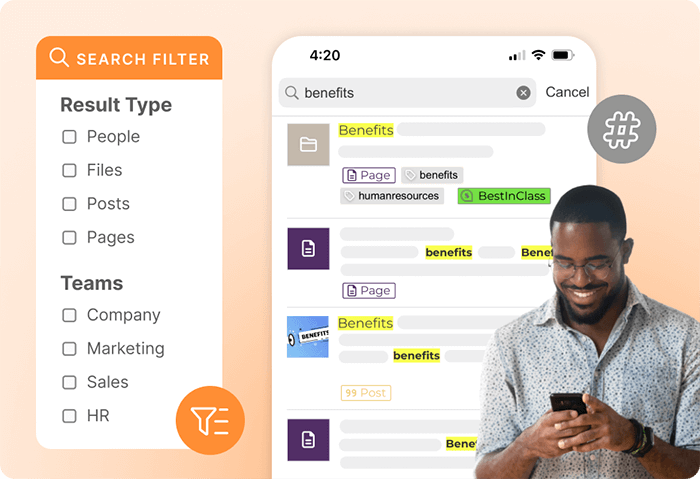
MangoApps federated search connects to each platform's API and returns results from SharePoint document libraries, Teams channel files, and Google Drive shared content alongside native MangoApps content in a single results view. Employees enter a query in the MangoApps search bar and see a ranked list spanning all connected systems — with file names, folder paths, and platform indicators visible so they can immediately determine where a file lives and who holds access to it.
Files stay in the platforms where they were created. Permissions stay in force: a file that a user cannot access in SharePoint remains inaccessible when it surfaces in MangoApps search results. The existing permission models of SharePoint, Teams, and Google Drive are respected by the federated layer. Nothing is migrated, and no existing governance configuration is changed.
Setup uses existing SSO credentials. Administrators connect each integration through the MangoApps integration settings panel using service account credentials and OAuth consent flows. For Microsoft integrations, a Microsoft 365 administrator grants the necessary API permissions; for Google Drive, a Google Workspace administrator does the same. Most organizations see results from federated sources within 24 hours of activation, with a scheduled refresh cycle handling index updates after that.
The AI layer: what unified search actually means
The version of federated search that matters for enterprise adoption is not keyword-matched results across three file systems. It is a search experience that understands intent and personalizes results by role — which is what separates a useful unified search layer from a file-system aggregator.
MangoApps applies an AI layer across the unified search index that weights results by recency, by the user's role and team membership, and by what colleagues in the same department have accessed recently. Natural language queries — "Q3 budget approval process," "emergency protocol updates," "new hire onboarding checklist" — return relevant documents even when none of them are titled with those exact words. The AI layer identifies semantic intent and ranks results accordingly across SharePoint, Teams, Drive, and native MangoApps content simultaneously.
Personalization means that search results for the same query differ meaningfully between users. A finance team member and a field operations manager asking the same question should see different files at the top of their results — the content most relevant to their role, not a generic ranked list. This is the capability that makes unified search useful rather than merely complete: results that improve as the system learns which content each user actually relies on, rather than returning the same static set of files regardless of who's asking.
For knowledge management teams, this closes the gap that every multi-platform deployment creates — the inability to run a single authoritative search across the organization's entire file ecosystem. Document repositories, project files, and shared drives become one searchable space, with intent-ranked results rather than keyword-matched file names.
The frontline case: where federated search has the largest impact
The business case for federated search is frequently framed around desk workers and office-based teams. The stronger case may be for frontline employees. Per Emergence Capital, 80% of the global workforce is deskless — working in manufacturing, healthcare, retail, logistics, and public service settings where desktop access is intermittent or unavailable.
A frontline worker who needs a file typically searches on a mobile device between tasks. If that search requires switching between three applications with separate mobile interfaces and separate authentication flows, most workers will not complete it. They will ask a supervisor or proceed without the information they need. The workaround that desk workers default to — asking a colleague — is often unavailable to frontline staff working alone or on rotating shifts without reliable desktop access.
MangoApps mobile-first design means federated search functions identically on a smartphone and on a desktop. One query surfaces results across SharePoint, Teams, Drive, and MangoApps content — with no switching, no re-authentication, and no separate application to open. A warehouse associate checking an updated safety procedure, a retail employee confirming a product specification, or a healthcare aide reviewing a protocol change can complete the search in the time it takes to type a query.
The governance case for IT
For IT and operations teams, the governance argument for federated search is at least as strong as the productivity argument.
When files exist across SharePoint, Teams, and Google Drive with no unified visibility layer, IT teams cannot enforce consistent access controls, version tracking, or retention policies across all three platforms. Compliance audits become manual reconstruction exercises — export from SharePoint, cross-reference with Teams, reconcile against Drive — rather than a single-platform query. The SharePoint first-year cost range of $130,000–$426,000 for a 1,000-user enterprise (per Awesome Technologies' 2025 modeling) represents only the SharePoint layer. Adding Teams and Google Drive governance overhead independently multiplies the compliance surface area without adding any cross-platform visibility into what exists where.
Federated search adds the visibility layer that governance teams need without consolidating file storage. Access control remains enforced by each underlying platform. The unified search index adds the auditability that makes cross-platform governance tractable: IT teams gain visibility into what's being searched and which content is being accessed across all three systems from a single interface, without requiring a separate governance tool for each platform.
For organizations evaluating federated search as part of a broader modern intranet investment, the ClearBox Consulting 2026 Intranet and Employee Experience Platforms Report evaluates MangoApps against competing platforms using the criteria enterprise buyers apply in formal procurement — including integration depth, security posture, and total cost of ownership across the full platform stack.
What the internal business case should say
Organizations building a procurement justification for federated search need to answer three questions their budget stakeholders will ask: what does this cost against what we're already paying, how long does deployment take, and what is the measurable return?
The cost comparison belongs against current tool expenditure, not against zero. Organizations running SharePoint, Teams, and Drive separately are already paying implementation, customization, and governance overhead for each platform independently. Per Awesome Technologies' 2025 modeling, SharePoint's first-year total for a 1,000-user enterprise ranges from $130,000 to $426,000 before Teams and Drive governance are accounted for. The federated search layer consolidates the visibility overhead without replacing any of the platforms — the question is whether to add a unified search layer on top of existing infrastructure, not whether to replace it.
The deployment timeline is determined by OAuth setup and API permissions, not development work. Administrators connect each integration through the MangoApps settings panel using existing service account credentials. Most organizations see federated results within 24 hours. Governance controls stay in place in the underlying platforms; nothing needs to be rebuilt or reconfigured outside of MangoApps.
The return calculation starts with the IDC figure of 2.5 hours per day per employee lost to information search. For a 500-person organization with an average fully-loaded labor cost of $35 per hour, recovering even one hour per day across the workforce represents $4.4 million in annual labor efficiency. The realistic figure depends on current search tool adoption rates — but the direction is not in question, and the headcount multiplier makes even modest per-person improvements significant at scale.
Per Gallup's 2026 research on global workforce engagement, information disconnection compounds over time: workers who cannot find what they need become workers who stop looking, and workers who stop looking disengage. Federated search is one practical infrastructure fix with a direct productivity mechanism — not an engagement program, but a search layer that makes the information employees need findable from wherever they work.
For organizations running SharePoint, Teams, and Google Drive as separate systems today, federated search within MangoApps is not a migration. Existing files stay where they are, existing permissions stay in force, and the unified search layer connects all three systems from a single interface. The question is not whether to replace the file storage infrastructure — it is whether to give employees a single place to search it, from any device, without a judgment call about which platform to try first.
The MangoApps Team
We're the product, research, and strategy team behind MangoApps — the unified frontline workforce management platform and employee communication and engagement suite trusted by organizations in healthcare, manufacturing, retail, hospitality, and the public sector to connect every employee — deskless or desk-based — to the people, tools, and information they need.
We write about enterprise AI for the workplace, internal communications, AI-powered intranets, workforce management, and the operating patterns behind highly engaged frontline teams. Our perspective is grounded in a decade of building for frontline-heavy industries and shipping AI agents, employee apps, and integrated HR workflows that real employees actually use.
For short-form takes, product news, and field notes from customer rollouts, follow Frontline Wire — our ongoing stream on AI, frontline work, and the modern digital workplace — or learn more about MangoApps.
Dive Deeper