MangoApps NoCode Workflow Apps: Build Custom Productivity Apps Without Writing Code
Employees spend an average of 2.5 hours per day searching for information, per IDC. That figure understates the real cost: when the tools meant to help workers are hard to find, role-irrelevant, or accessible only during business hours at a desktop, the time lost compounds across every shift. For operations teams managing distributed workforces, the standard remedy — submit a ticket, wait for IT, deploy in six weeks — often makes the underlying problem worse.
MangoApps NoCode Workflow Apps addresses this at the source. HR, operations, and IT teams can build, customize, and deploy cloud based productivity apps directly inside the MangoApps platform — without developer involvement, without ticketing systems, and without procuring separate point solutions. The apps live where employees already work: the same hub they use for communications, scheduling, and training.
This article covers what NoCode Workflow Apps does, where it returns the highest value, and which workflows to build first.
Why the deployment bottleneck is the actual problem
The most common productivity problem in operational environments is not the absence of tools. It is that the tools that exist do not reach the people who need them, in formats they can actually use.
Per Social Edge Consulting, only 13% of employees use an intranet daily. Nearly a third never log in at all. Per SWOOP Analytics, the average employee spends six minutes per day using intranet tools — less time than most meetings. These are not engagement failures. They are design failures: tools built for office-based, desktop-equipped workers, deployed to shift-based, mobile-first workforces across time zones and languages.
The answer is not more tools. It is better-targeted tools — built faster, by the people who understand the process, and deployed in the environment employees already inhabit.
What NoCode Workflow Apps does
NoCode Workflow Apps is a drag-and-drop application builder embedded in the MangoApps platform. Non-technical managers use it to create forms, dashboards, approval chains, and data-capture screens. The apps deploy in the same environment where employees receive communications and view schedules — no separate login, no context switching.
Core capabilities:
- Visual interface designer — drag-and-drop elements to build employee-facing apps without code
- Pre-built templates — starting points that reduce deployment time for common processes
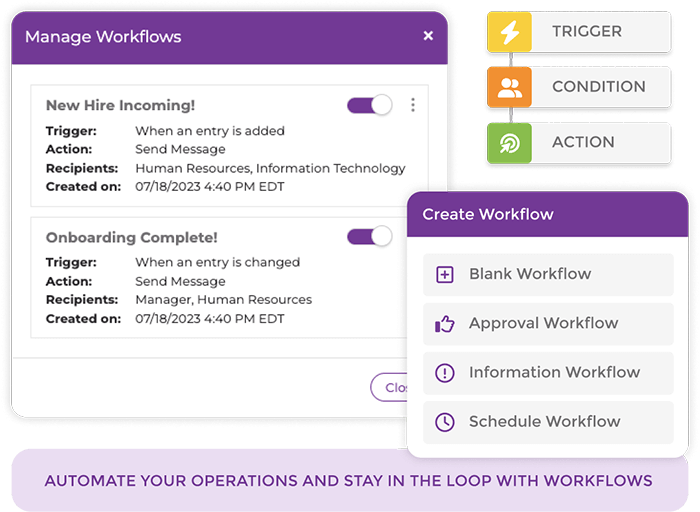
- Automated workflow logic — triggers, conditions, and branching rules that handle multi-step processes end-to-end
- AI-augmented building — describe a workflow in plain language; the platform generates an initial app structure, connected to OpenAI, Gemini, Anthropic, and Azure OpenAI
- Acknowledgement tracking — confirms which employees have reviewed a policy update and automatically triggers follow-up for those who have not, supporting compliance workflows
- Inline translation — multilingual support embedded directly into employee-facing apps, without maintaining separately translated versions
The AI-augmented building capability is the practical differentiator from earlier no-code tools. Rather than configuring logic from scratch, a manager describes a workflow — "I need a form where employees submit attendance, it routes to their direct manager for approval, and flags HR if not resolved within 24 hours" — and gets a working starting point to edit. That shifts the effort from construction to refinement.
Where frontline workers see the clearest return
Per Emergence Capital, approximately 80% of the global workforce is deskless. Factory floor workers, retail associates, healthcare aides, and field technicians cannot access desktop-first productivity programs the way office workers can. Most enterprise workflow tools were not built for them — and the operational drag from paper-based processes reflects it.
NoCode Workflow Apps is designed for both audiences, but the frontline use cases have the highest return because the processes being replaced are labor-intensive, error-prone, and slow.
Attendance submissions. Employees submit attendance through a structured form on a mobile device. Managers receive a notification and approve, flag, or escalate within the platform. The paper sign-in sheet disappears; so does the manual transcription that falls on HR.
Safety checklists and SOP operations forms. Workers complete required pre-task checks on mobile. Completion is logged automatically. Managers see real-time completion rates across locations, replacing the lag of collecting paper at shift end.
Shift swap requests. Requests route automatically to the right manager based on shift type, location, or role — without an email chain. For teams managing complex scheduling structures, this integrates directly with the MangoApps shifts and schedules solution.
Policy acknowledgement flows. The platform confirms which employees have seen a specific policy update and triggers follow-up for those who have not, with a logged audit trail. In regulated industries — healthcare, manufacturing, logistics — this replaces manual tracking spreadsheets with documented, timestamped compliance records.
Multilingual workflows. For teams that span multiple languages, inline translation can be embedded directly into the app, eliminating the cost and delay of maintaining separate translated versions of the same form.
In documented enterprise deployments of no-code employee experience platforms, organizations have achieved 90% frontline adoption within six months and 50% faster new-hire onboarding when mobile-accessible workflows replace paper-based processes.
What office and knowledge worker deployments look like
The frontline cases tend to have the clearest before/after contrast. But office and knowledge worker applications follow the same logic: remove the dependency on IT for process changes that business teams understand better than developers do.
Approval workflows — for expenses, requests, and escalations — with conditional routing based on amount, department, or threshold. Configuration takes days, not sprint cycles.
Confidence and skill-assessment apps — employees flag their confidence in specific job tasks on a recurring basis. Managers see aggregate results by team or role, surfacing training gaps before they become performance problems.
Daily mood check-ins — a 30-second signal that tells managers whether team-level sentiment is trending before it shows up in quarterly survey results. Not a replacement for formal engagement surveys; a lightweight layer that runs between them.
How AI-augmented building changes the economics
The cost of building a workflow app has historically included developer time, QA cycles, and deployment coordination. No-code tools reduced the developer dependency but preserved the configuration burden — a manager still needed to understand form logic, conditional branching, and routing rules to build something useful.
AI-augmented building changes what "no-code" actually means in practice. The manager describes the workflow; the platform generates the structure. The manager edits a working draft rather than constructing one from scratch. That shift materially reduces the hours required to go from a process problem to a deployed solution.
MangoApps connects to multiple AI providers — OpenAI, Gemini, Anthropic, and Azure OpenAI — so the generation capability is not limited to a single model. For teams evaluating platforms on AI capability alongside workforce operations fit, the 2026 Workforce Operations Trends eBook covers how organizations are consolidating AI-augmented tooling into unified employee hubs.
Three workflows to build first
Early adopters have identified three processes where replacing paper or email with automated workflow produces the most immediate operational lift. These are practical starting points for any team evaluating the feature.
1. Attendance submissions. The highest-frequency use case — daily or per-shift. The return compounds with every cycle: manual transcription disappears, approval routing speeds up, and managers gain real-time visibility across locations. For shift-based teams, this integrates directly with scheduling and time and attendance workflows, closing the loop between who showed up and how that feeds payroll and compliance records.
2. Safety checklist completion. Required in most industrial and healthcare environments. Digitizing the checklist closes the compliance lag between when checks happen and when managers know they happened. Completion is logged automatically — useful for both internal reviews and regulatory documentation, without the paper collection step at the end of each shift.
3. Policy acknowledgement flows. Regulatory or procedural updates require documented confirmation that employees received and acknowledged the change. Automated acknowledgement apps with follow-up triggers and logged completion replace the tracking spreadsheet — and extend coverage to shift workers who may not see a broadcast email until after the acknowledgement deadline.
What "no-code" requires from a manager
The practical question most operations leaders ask: can a non-technical team lead actually build this?
The honest answer is that it depends on the process. Simple forms and single-step approvals are deployable in hours by any manager who understands the process they want to automate. Multi-step workflows with conditional branching — if the employee has been flagged three times, route to HR instead of the line manager — take longer and benefit from template starting points or AI-generated scaffolding.
NoCode Workflow Apps is designed for managers who understand the workflow they want to automate, not for managers who want to learn software configuration. IT remains the appropriate owner for integrations, security reviews, and audit requirements. The no-code model removes IT from the build path without removing IT from oversight.
The case for consolidating workflows into a single hub
Per the Gallup 2026 State of the Global Workplace, employee engagement correlates directly with whether workers feel the organization is paying attention to their experience. Tools that require frontline workers to log into a desktop system during business hours communicate, implicitly, that the tooling was not built for them.
Workflows deployed in a mobile-first hub — the same environment where employees receive communications, check schedules, and complete training — communicate the opposite. Each automated process reduces manager overhead, speeds up the experience for the employee doing the work, and adds to a compliance record that stands up to audit.
The starting point is one workflow: whichever paper-based or email-based process creates the most friction today. The deployment path that follows — adding use cases as the team builds confidence with the builder — is more durable than standing up a separate application for each operational problem.
The MangoApps Team
We're the product, research, and strategy team behind MangoApps — the unified frontline workforce management platform and employee communication and engagement suite trusted by organizations in healthcare, manufacturing, retail, hospitality, and the public sector to connect every employee — deskless or desk-based — to the people, tools, and information they need.
We write about enterprise AI for the workplace, internal communications, AI-powered intranets, workforce management, and the operating patterns behind highly engaged frontline teams. Our perspective is grounded in a decade of building for frontline-heavy industries and shipping AI agents, employee apps, and integrated HR workflows that real employees actually use.
For short-form takes, product news, and field notes from customer rollouts, follow Frontline Wire — our ongoing stream on AI, frontline work, and the modern digital workplace — or learn more about MangoApps.
Dive Deeper